With the continuous development of smart devices, more and more smart devices integrate voice interaction functions to improve human-computer interaction experience. The speech interaction function includes two parts: speech recognition and speech synthesis. This article try to upper model is a speech synthesis model FastSpeech ([1905.09263] FastSpeech: Fast, Robust and Controllable Text to Speech).
Because the model on the board needs to make some adjustments, I put the adjusted model code on personal github. Can go to https://github.com/unrea1-sama/FastSpeech\_X3\_PI to get the source code of the model.
1. Environment configuration
1. Model conversion tool chain installation
RDK Documentation (d-robotics.cc)
2. FastSpeech training and test environment configuration
The original FastSpeech model provides a label for a model’s duration prediction by distilling the duration of other models. Due to the tedious distillation operation, the FastSpeech2 approach to the length tag is adopted here: montreal forced aligner.
The installation of montreal forced aligner requires the use of conda. Can download miniconda after, according to the MFA official document list the steps to install https://montreal-forced-aligner.readthedocs.io/en/latest/getting\_started.html. You also need to install pytorch.
3. Obtain data
Training data is prepared in the following 2 steps:
(1) Use MFA to force the audio alignment to obtain the duration label. Since the standard shell data set used in this board test has its own alignment, we directly use the script to extract the alignment information of the data set.
(2) Prepare the phoneme set, phoneme duration and corresponding audio required for FastSpeech training.
Both of the above steps can be done by following my personal README on github.
4. Train the model
You can refer to my personal github README to do it.
5. Export the ONNX model
Exporting the ONNX model should be noted that opset needs to be specified as 11. When you export the model, you need to specify clear input and output names, which you need to use later in the model transformation phase. Since X3 PI only supports fixed-size inputs, the shape of the input here needs to be fixed in advance.
After the model is successfully exported, you can use the hb_mapper checker tool to verify whether there are unsupported model operators in the exported ONNX model. Run the following command:
hb_mapper checker --model-type onnx --march bernoulli2 --model PATH_TO_ONNX --input-shape x 1x1x128x1 --input-shape x_length 1x1x1x1
Note that the --input-shape parameter needs to be configured for each input, which in FastSpeech is two parameters, one is the phoneme sequence x, and the other is the length of the phoneme sequence x_length. After the check is complete, you can see the hb_mapper_checker.log file in the current directory, which records the log output when the tool is running, which can help us troubleshoot incompatible errors during the model check process. The HzRsqrt operator, which appears in the LayerNorm layer, may not be supported during the check, as shown in the next section where LayerNorm supports an incomplete corresponding solution on X3 PI.
6. Model transformation
Model transformation of official documentation at https://developer.horizon.ai/api/v1/fileData/doc/ddk\_doc/navigation/ai\_toolchain/docs\_cn/horizon\_ai\_toolchain\_ user_guide/ model_convert.html. In the process of conversion, we need to prepare calibration data. Specifically, calibration data needs to be prepared for each input to the model. For the input x and x_length of FastSpeech, we create two folders x and x_length, and store the calibration data corresponding to x and x_length in each folder. For example, x/0.bin and x_length/0.bin respectively correspond to a group of data used to calibrate the model. Calibration data is prepared according to their needs, the more prepared, the better the model calibration, but the more time it will take. You also need to write configuration files for the transformation model. A sample file slim_transformer_onnx.yaml is available on Github. You need to configure the onnx_model, working_dir, and cal_data_dir fields based on your own Settings. These three fields specify the path to the onnx model to be converted, the path to save the model conversion results, and the path to calibrate the model data, respectively. The HzRsqrt operator, which appears in the LayerNorm layer, may be indicated during the conversion process, as shown in the next section where LayerNorm supports an incomplete corresponding solution on X3 PI.
The commands for model transformation are:
hb_mapper makertbin --config Configuration path name --model-type onnx
7. Board test
After the conversion is completed, we can get the corresponding bin file of the model. To reason with the development board, we use python to reason with the model. Inference script parameters include --model_path, --str, and --dict. Where model_path is the path of the bin file, str is the pinyin sequence to be synthesized, and dict is the mapping table of phonemes and phonemes id. For an input pinyin sequence, such as 'ka3 er3 pu3 pei2 wai4 wai4 sun1 wan2 hua2 ti1 ', the model first converts the pinyin into a phoneme sequence, and then converts the phoneme into a phoneme id. Github provides an inference script onnx_board.py for use on the development board.
Second, the code needs to make some adjustments when the model is on the board
Since the X3PI chip is specially optimized for CV, the speech synthesis model is directly exported to ONNX and then loaded onto the board, resulting in a large number of operators being run on the CPU because they do not meet the needs of BPU acceleration. The following problems were encountered when FastSpeech was launched:
1. Enter data. Input is usually a CV (batch size, channels, height, width) of the image, and voice synthesis model input is usually a (batch size, time, channels) sequences, so the input model of sequence data need to be converted into 4 d input, For example (batch size, channels, 1, time). At the same time, the input and output dimensions need to be fixed in advance, for example, the input time needs to be set to 128.
The speech synthesis model needs to obtain the Embedding of the phoneme through Torx.nn. embedding after converting the input phoneme to a phoneme id of type long. However, the input of the X3 PI BPU model needs to be float, so when exporting the model, the phoneme id must be converted to float32, then converted to long, and then through the embedding layer.
2. Operator adjustment.
(1) Convolution layer. As mentioned above, the input of CV is usually a 4-dimensional data, and the input of speech synthesis model is usually a 3-dimensional sequence. So the speech synthesis model makes a lot of use of Conv1D. Since the BPU of X3 PI does not support Conv1D, all Conv1D inside the speech synthesis model need to be converted to the Conv2D supported by the BPU. If the kernel size of Conv1D is k and the dimension of the input data is (batch size, channels, time), You need to convert the input to (batch size, channels, 1, time) and set the kernel size of the Conv2D to (1, kernel size).
(2) Special treatment of Self-attention. Usually when we use softmax for attention calculations, we set the input padding part to a very small value. Since the BPU does not fully support the masked_fill operation, the padding part is set to 1e-5 using score*mask+(1-mask)*1e-5.
(3) Try to use the network function of pytorch to build the network, which can prevent numerical calculation errors in the converted model and affect the accuracy of the final result.
(4) The support of LayerNorm on X3 PI is not perfect, the specific problem is that the HzRsqrt operator is not supported when the model is converted. I spoke to my colleagues at Horizon who were in charge of developing the toolchain, and they gave me a temporary patch to fix the problem. The official version of the subsequent toolchain can support the HzRsqrt operator, completely solving the problem that LayerNorm does not support.
Third, the final effect
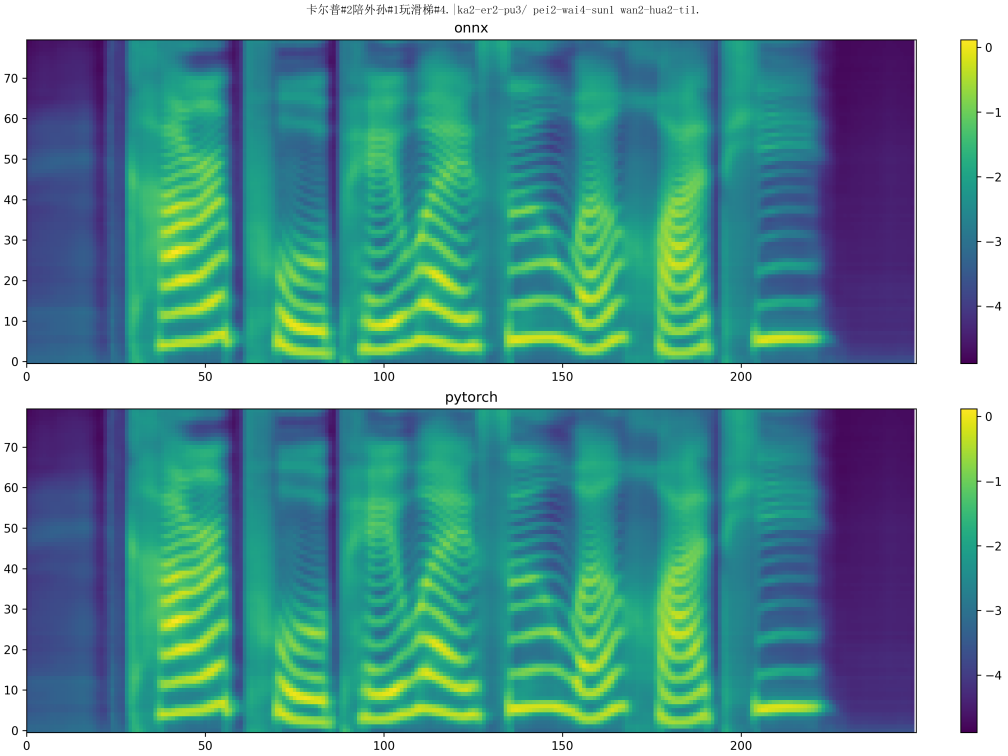
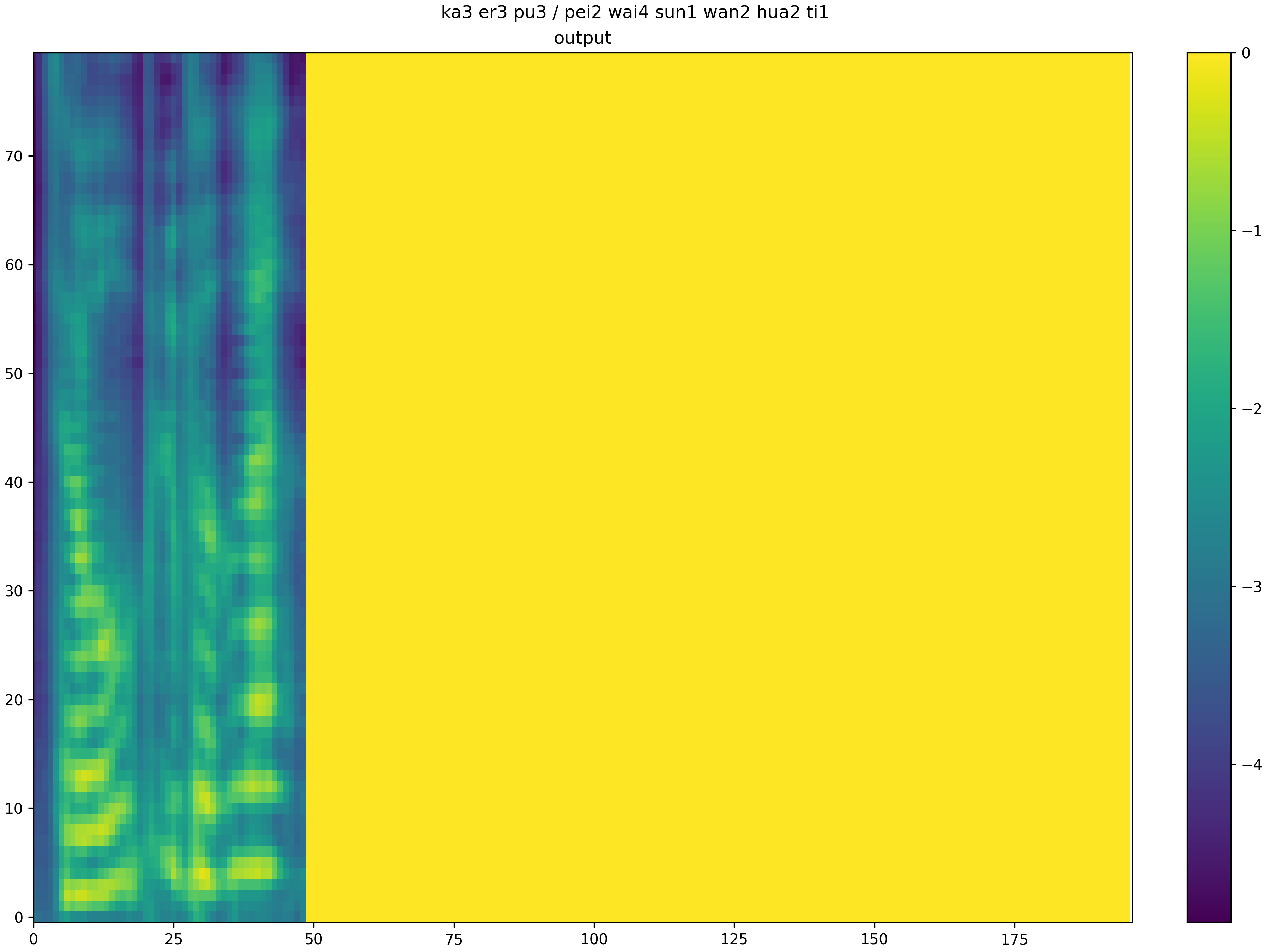
Since the converted model does not carry out any additional optimization, the accuracy loss is relatively serious at present. The two images below are a composite of the same sentence: “Culp plays on the slide with his grandson.” The top half of the first figure is the synthesis result of the pytorch model after ONNX conversion, and the bottom half is the synthesis result of the original pytorch model, which shows little difference. The second picture shows the composite effect of the model after loading the board. It can be seen that the accuracy loss of the quantized model is very serious, and the length of the Mehr spectrum generated by the final generated model is very different from that generated by the model before conversion (more than 50 frames and more than 200 frames), and the content generation of the Mehr spectrum is also poor. At this point, various optimizations are needed to truly achieve high-quality speech synthesis.