
repo link: GitHub - shockley6668/gemma4-e2b-rdk-s100p · GitHub
Demo
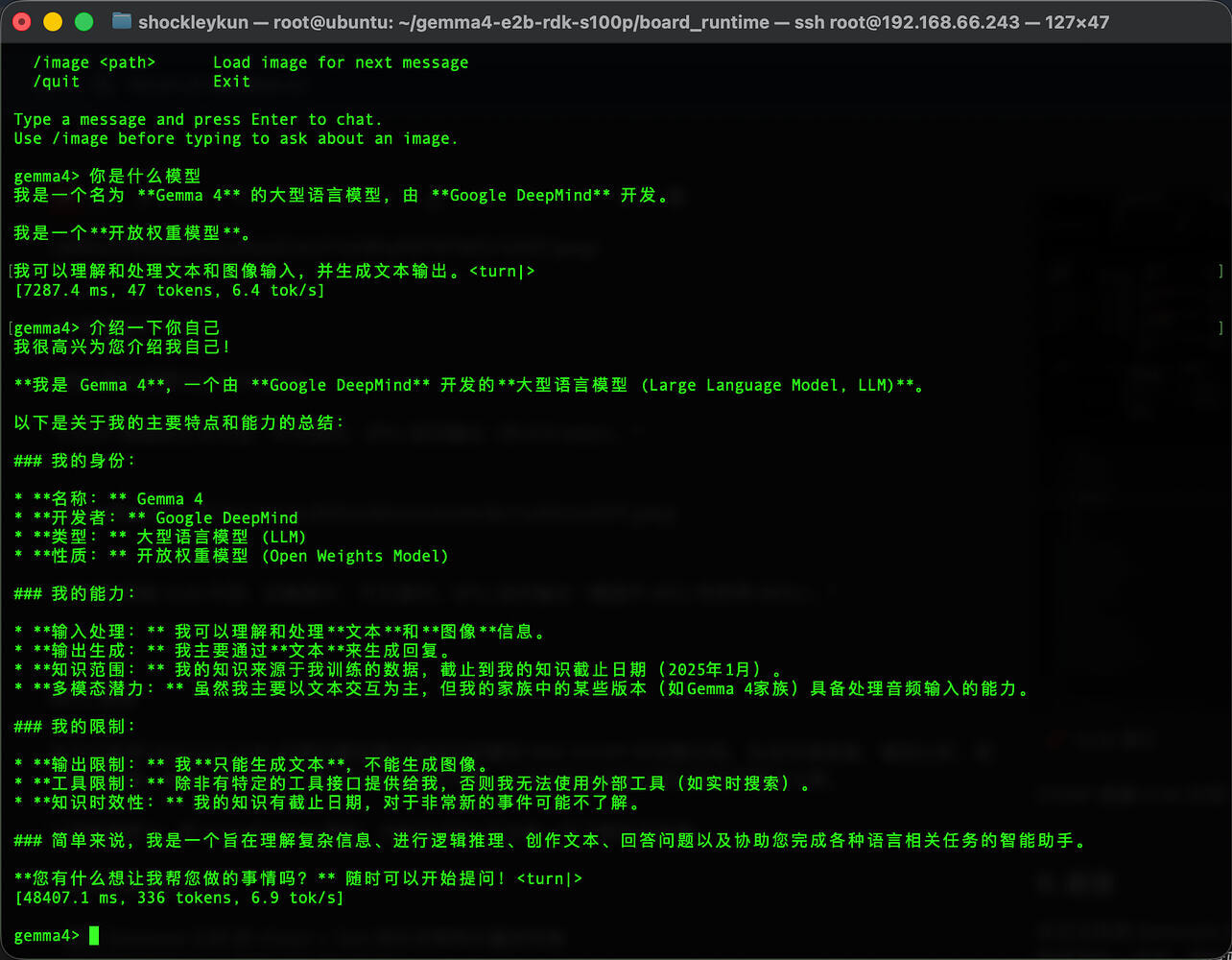
Text chat on S100P: ask in Chinese, stream the reply on BPU (~6.9 tok/s).
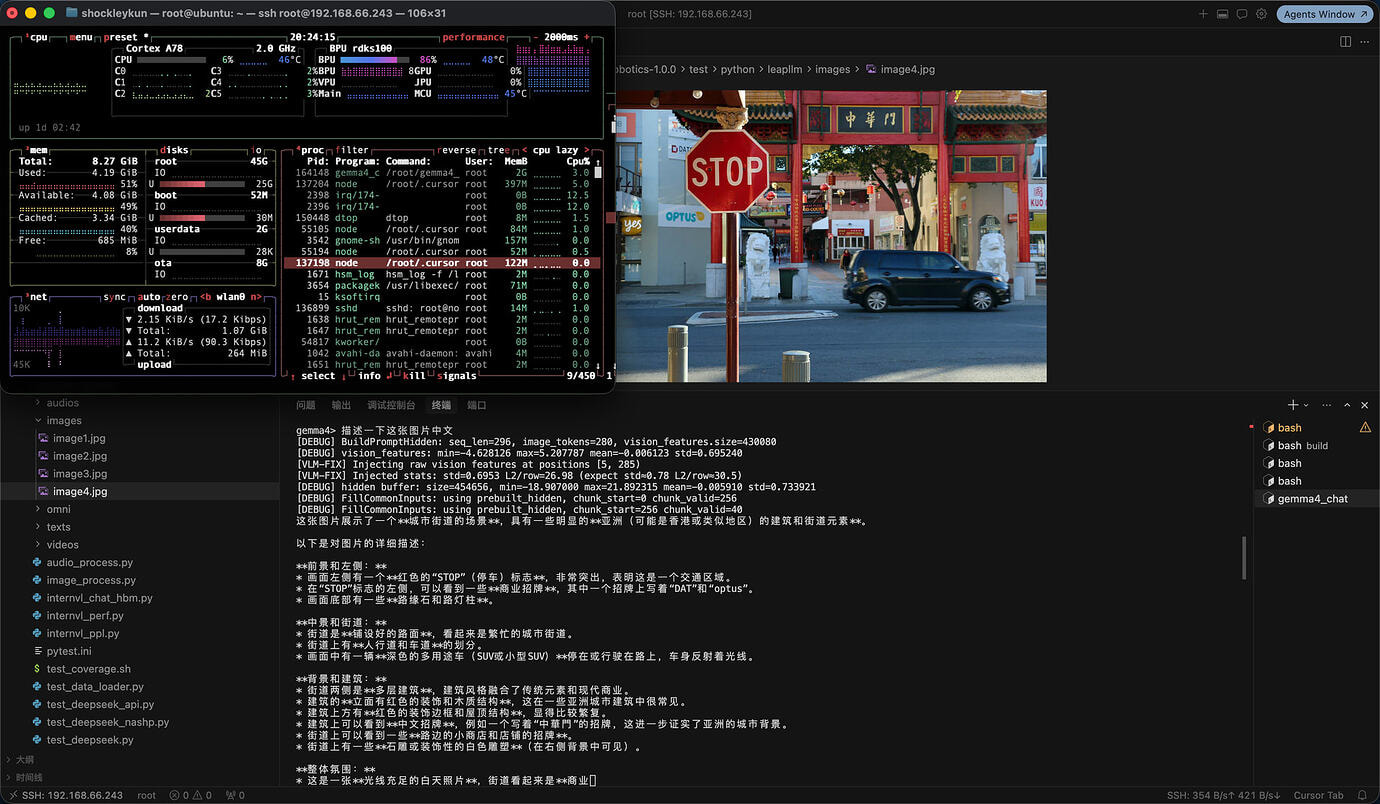
VLM chat on S100P: load an image, ask in Chinese, stream the reply on BPU (86% BPU utilization).
0. Introduction
This document walks through quantizing and deploying the Gemma4-E2B multimodal model on the RDK S100P — environment setup, model analysis, calibration data, compilation, accuracy verification, packaging, and on-board deployment — including pitfalls we hit and how we fixed them.
Audience: developers comfortable with Linux/Python who have some familiarity with the D-Robotics RDK platform.
After reading you will:
- Understand Gemma4-E2B’s Vision + Text dual-branch architecture and fusion mechanism
- Run PTQ quantization compilation on your own PC
- Know how calibration data affects accuracy
- Verify quantized accuracy (including end-to-end fusion checks)
- Produce an HBM model package ready for S100P deployment
1. Project Overview
1.1 What is Gemma4-E2B
Google Gemma4 is a multimodal model family released on March 31, 2026. E2B is the lightweight variant:
| Spec | Value |
|---|---|
| Vision Encoder | 16-layer ViT, hidden=768, ~150M params |
| Audio Encoder | 12-layer Conformer (not covered here) |
| Text LLM | 35-layer Decoder, hidden=1536, ~2B effective params |
| Vocab | 262,144 |
| Vision soft tokens | 280 per image |
E2B Vision and Text are defined separately (Gemma4Config), unlike the unified 12B architecture (Gemma4UnifiedConfig). Adaptation differs accordingly.
1.2 RDK S100P Hardware Constraints
Quantization and on-board deployment in this guide target the RDK S100P with --march nash-m.
| Item | Value | Quantization impact |
|---|---|---|
| RAM | 12 GB LPDDR5 | Model + KV + system should stay under ~10 GB |
| BPU | Nash-M, 80 TOPS | march=nash-m |
| BPU cores | 1 | core_num=1, vit_core_num=1 |
1.3 OE-LLM Toolchain
OE-LLM is D-Robotics’ official LLM quantization/compilation framework:
| Component | Role |
|---|---|
leap_llm |
PyTorch model defs, calibration forward, compile-mode export |
hbdk4_compiler |
MLIR conversion + HBO compilation (BPU instructions) |
oellm_build.py |
One-shot entry: calibrate → export → compile → link |
hbdk4_runtime |
On-board BPU inference C++ runtime |
1.4 End-to-End Data Flow
Raw image (any size)
    │
    ▼  Resize 672×960 + [0,1] normalize + 16×16 patchify
[2520, 768] f16  (patch embeddings)
    │
    ▼  Vision HBM (ViT 16 layers + Pooler + Projector)
[280, 1536] f32  (soft tokens, projected to text hidden space)
    │
    ▼  Replace embeddings at image soft-token positions (masked_scatter)
inputs_embeds [seq_len, 1536]  (text embeddings + vision soft tokens)
    │
    ▼  Text HBM (35-layer Decoder + PLE + LM Head)
logits [1, seq_len, 262144]
    │
    ▼  Sample → next token
Two HBMs plus one external embedding table — that’s the full deployment model set.
2. Model Architecture
You must understand the structure before quantization; otherwise compile flags and on-board inference will misalign.
2.1 Gemma4 Family Differences
| Model | Architecture | Vision | Text layers | Text hidden | This tutorial |
|---|---|---|---|---|---|
| E2B | Gemma4Config |
16-layer ViT | 35 | 1536 |  |
| E4B | Gemma4Config |
16-layer ViT | 42 | 2048 | Portable |
| 12B | Gemma4UnifiedConfig |
Unified | — | — | Different adaptation |
E2B and E4B share Gemma4Config; adaptation code is reusable. Main differences are text layer count and hidden_size.
2.2 Vision Encoder
Full vision path: PatchEmbed → 16 ViT Encoder layers → Pooler → Projector
Input: pixel_values [num_patches, patch_dim]   i.e. [2520, 768] f16
  │
  ├─ PatchEmbedding
  │   x = 2*(pixel_values - 0.5)        ← [0,1] → [-1,1]
  │   x = ConstFakeQuant(8)(x)
  │   hidden = Linear(768, 768)(x)       ← input_proj
  │   hidden += position_embeddings      ← precomputed 2D positional encoding
  │
  ├─ 16 ViT Encoder layers
  │   Each: RMSNorm → Attention(12 heads) → Residual → RMSNorm → MLP → Residual
  │   Uses 2D RoPE (rope_theta=100)
  │
  ├─ Pooler (3×3 average pooling)
  │   2520 patches → 280 patches (42/3 × 60/3 = 14 × 20)
  │   pooled *= sqrt(768)                ← hidden_size^0.5 scaling
  │
  └─ Projector (RMSNorm + Linear)
      768 → 1536                         ← project into text hidden space

Output: [280, 1536] f32
Key parameters (inferred from E2B config.json):
# Key vision_config fields
default_output_length = 280    # → determines h_patches, w_patches
patch_size = 16
pooling_kernel_size = 3        # 3×3 pooling

# Derive patch grid:
# num_patches_before_pool = 280 * 3 * 3 = 2520
# Find h, w closest to square with h*w=2520 and h%3==0, w%3==0
# → h_patches=42, w_patches=60
# → input image 42*16=672 × 60*16=960
Note: Gemma4VisionConfig defaults to h_patches=w_patches=48, but E2B is actually 42×60. load_model infers the correct values from default_output_length and pooling_kernel_size. Do not override manually.
2.3 Text LLM
Core text stack: Embedding + 35 Decoder layers + RMSNorm + LM Head
Input: inputs_embeds [seq_len, 1536] + input_ids [1, seq_len]
  │
  ├─ Main embedding (external tok_embeddings.bin)
  │   embed = weight[token_id] * √1536
  │   √1536 ≈ 39.19
  │
  ├─ Per-Layer Embeddings (PLE) — Gemma4-specific
  │   token_identity = embed_tokens_per_layer(token_id) * √256
  │   context_aware  = RMSNorm(Linear(inputs_embeds)) * (1/√1536)
  │   per_layer_input = (token_identity + context_aware) * (1/√2)
  │   → fed into each Decoder layer
  │
  ├─ 35 Decoder layers
  │   Full attention every 5 layers (layers 4,9,14,19,24,29,34)
  │   Others use sliding attention
  │   KV sharing: last 20 layers reuse KV from matching layer types in first 15
  │
  ├─ RMSNorm
  └─ LM Head (Linear 1536 → 262144)

Output: logits [1, seq_len, 262144]
Key parameters:
| Parameter | Value | Notes |
|---|---|---|
chunk_size |
256 | Prefill chunk length |
cache_len |
4096 | Max KV cache length |
sliding_window |
512 | Sliding attention window |
head_dim |
256 (sliding) / 512 (full) | Attention head dim |
num_attention_heads |
8 | |
num_key_value_heads |
1 | GQA, 1 KV head |
num_kv_shared_layers |
20 | Last 20 layers share KV |
embed_scale |
√1536 ≈ 39.19 | Main embedding scale |
per_layer_input_scale |
1/√2 ≈ 0.707 | PLE merge scale |
Text HBM inputs (5 main + 30 KV caches):
| Input | Shape | Type | Notes |
|---|---|---|---|
_input_0 |
[256, 1536] |
f32 | inputs_embeds (includes √1536; vision injected here) |
_input_1 |
[1, 256] |
i64 | input_ids |
_input_2 |
[256] |
i32 | position_ids |
_input_3 |
[256, 4096] |
si16 | full_mask |
_input_4 |
[256, 4096] |
si16 | sliding_mask |
_input_5~34 |
[4096, 1, 256/512] |
si8 | 15 K + 15 V caches |
Why tok_embeddings.bin is external: vocab 262144 × hidden 1536 × 4 bytes ≈ 1.5 GB. Embedding it in the HBM would bloat the model and lookup is inefficient on BPU. OELLM does embedding lookup + √1536 scaling at runtime and feeds inputs_embeds into the HBM.
2.4 Vision-Text Fusion
This is the easiest place to get on-board inference wrong. Gemma4 VLM fusion has three steps:
Step 1: Build token sequence
[255999]  [249560]×280  [258882]  [text tokens...]
 <|image>   ── soft     <image|>   "What do you see?"
 BOI       placeholders×280 EOI     actual text
249560 is the  (U+1F5BC) image soft-token ID — one row of ViT output per position.
Step 2: Replace embeddings with masked_scatter
In HuggingFace reference code, replace inputs_embeds at soft-token positions:
# Pseudocode
inputs_embeds = embed_tokens(input_ids) * embed_scale  # lookup all tokens first
image_mask = (input_ids == 249560)                    # find 280 positions
inputs_embeds[image_mask] = vision_features           # direct replace, no post-processing
Direct replacement — no L2-norm, no √1536, no extra scaling. Vision HBM output is already projected to text hidden space in the Projector.
Step 3: PLE at image positions
The PLE token-identity branch at image positions does not use the image token’s per-layer embedding. It uses the pad embedding (token_id=0) per-layer vectors — matching HuggingFace source behavior.
3. Environment Setup
3.1 System Requirements
| Item | Minimum | Recommended |
|---|---|---|
| OS | Ubuntu 22.04 | Same |
| RAM | 64 GB | 128 GB+ (Text compile peaks ~100 GB) |
| GPU | None (CPU calibration OK) | CUDA GPU (Vision calibration speedup) |
| Disk | 200 GB free | 300 GB+ (Text intermediates ~68 GB) |
3.2 Install SDK + conda + Dependencies
# 1. Download OE-LLM SDK (from D-Robotics official channel)
# Refer to: https://developer.d-robotics.cc/
tar xzf D-Robotics_LLM_S100_1.0.0_SDK.tar.gz

# 2. Create conda environment
conda create -n oellm python=3.10 -y
conda activate oellm

# 3. Install dependencies (order matters!)
cd D-Robotics_LLM_S100_1.0.0_SDK/oellm_build
pip install -r requirements.txt
pip install hbdk4_compiler-*.whl
pip install hbdk4_runtime_aarch64*.whl   # board runtime; optional on PC
pip install leap_llm-*.whl
Why install order matters: requirements.txt includes PyTorch and base deps first; hbdk4_compiler and leap_llm are version-coupled — install in order to avoid conflicts.
3.3 Get Community Adaptation Code
The SDK’s bundled leap_llm does not include Gemma4 model definitions. Get them from the community repo:
cd ~/gemma   # your working directory

# Clone community reference repo
git clone https://github.com/xiongqi123123/RDK_OE_LLM_ZOO.git

# Symlink leap_llm into your project (for easy edits)
ln -s $(python -c "import leap_llm; import os; print(os.path.dirname(leap_llm.__file__))") leap_llm
leap_llm/models/gemma4/ and leap_llm/apis/model/gemma4.py are the core Gemma4 adapters. model_factory.py registers gemma4-e2b-vision and gemma4-e2b-text.
3.4 Download Gemma4-E2B Weights
From HuggingFace (access approval required):
# Option A: huggingface-cli
huggingface-cli download google/gemma-4-e2b-pt --local-dir ./gemma4-e2b

# Option B: git lfs
git lfs install
git clone https://huggingface.co/google/gemma-4-e2b-pt ./gemma4-e2b
Expected files: config.json, model.safetensors, tokenizer.json, tokenizer_config.json, chat_template.jinja, etc.
4. Calibration Data
PTQ (Post-Training Quantization) does not train weights; it computes quantization scales from activation distributions on calibration data. The closer calibration matches real inference, the better the accuracy.
4.1 Why Calibration Data Matters
PTQ workflow:
- Run calibration data through the float model (forward pass)
- Collect min/max/distribution of activations per layer
- Compute INT8 scale and zero-point
- Quantize weights and activations with those scales
If calibration distribution diverges from inference (e.g. solid color blocks vs real photos), scales are wrong and feature directions get distorted.
4.2 Vision Calibration
Vision calibration uses 50 real COCO val2017 images in calibration_data/images/. Download script:
python download_coco_calib_images.py
You can also add your own images (jpg/png/bmp/webp) to calibration_data/images/.
4.3 Text Calibration
Text calibration needs diverse prompts in OELLM JSON format:
[
  {"text": "What is the capital of France?"},
  {"text": "请用一句话介绍中国的长城。"},
  ...
]
Prepare 100–200 entries covering languages, lengths, and topics. We used 150 entries.
4.4 Calibration Directory Layout
calibration_data/
├── images/              # Vision calibration (50 COCO images)
│   ├── coco_00_000000000802.jpg
│   ├── coco_01_000000280325.jpg
│   └── ...
├── text/                # Text calibration (150 prompts)
│   └── calibration.json
└── text_verify/         # Text accuracy check (2 short prompts)
    └── calibration.json
5. Vision Compilation
5.1 Compile Command
cd ~/gemma
conda activate oellm

# Increase stack size (required by hbdk4 compile_hbo; otherwise segfault)
ulimit -s unlimited

python -u $(python -c "import leap_llm; import os; print(os.path.dirname(leap_llm.__file__))")/apis/oellm_build.py \
    --model_name gemma4-e2b-vision \
    --march nash-m \
    --input_model_path ./gemma4-e2b \
    --output_model_path ./output/gemma4_e2b_vision \
    --calib_image_path ./calibration_data/images \
    --device cuda:0 \
    --vit_core_num 1 \
    2>&1 | tee output/vision_compile.log
| Parameter | Value | Notes |
|---|---|---|
--model_name |
gemma4-e2b-vision |
Registered in model_factory.py |
--march |
nash-m |
S100P march |
--input_model_path |
HuggingFace weights dir | config.json + model.safetensors |
--output_model_path |
Output directory | Compile artifacts |
--calib_image_path |
COCO image dir | 50 real images |
--device |
cuda:0 |
GPU for calibration forward (CPU works, slower) |
--vit_core_num |
1 |
Single core in this guide |
Do not use --verifier here: post-compile verifier reports gemma4-e2b-vision does not support LLM (it applies LLM verification to VLM). The HBM is valid — run verifier_cli.py separately.
5.2 Compile Pipeline
oellm_build.py runs four steps:
1. Export     — float model → BC (graph with quant scales)
2. Convert   — BC → MLIR (target ISA)
3. Compile   — MLIR → HBO (BPU binary)      ← slowest, ~100 min
4. Link      — HBO → HBM (final model)
Typical log:
[Gemma4VisionApi] Loaded 50 calibration images
[Gemma4VisionApi] Running calibration...
Calibrating: 100%|██████████| 50/50 [02:30<00:00]
[Gemma4Vision] Exporting...
Function 'export_module' done in 5.3s
[Gemma4Vision] Converting MLIR...
Function 'convert_mlir' done in 19.3s
[Gemma4Vision] Compiling HBO (core_num=1)...
Function 'compile_hbo' done in 6620.3s     ← ~110 min
[Gemma4Vision] Linking HBM...
Function 'link_models' done in 10.5s
[Gemma4Vision] Done: ./output/gemma4_e2b_vision/gemma4-e2b_vit_ptq.hbm
compile_hbo is CPU single-threaded for ViT; HBDK_JOBS has little effect.
5.3 Artifacts
output/gemma4_e2b_vision/
├── gemma4-e2b_vit_ptq.bc              # 620 MB  exported BC
├── gemma4-e2b_vit_ptq.convert.bc      # 202 MB  after MLIR convert
├── gemma4-e2b_vit_ptq.hbo             # 363 MB  HBO binary
└── gemma4-e2b_vit_ptq.hbm             # 329 MB  ← deploy this
Only .hbm is needed on board; intermediates can be deleted later.
5.4 FAQ
Q: compile_hbo segfaults
ulimit -s unlimited # run before compile
Q: --verifier fails with gemma4-e2b-vision does not support LLM
HBM was generated successfully. Verifier treats VLM as LLM. Use verifier_cli.py separately.
Q: No log output for a long time with conda run
conda run buffers stdout. Use conda activate oellm + python -u ... | tee log:
conda activate oellm
PYTHONUNBUFFERED=1 python -u ... | tee output/vision_compile.log
Q: Vision HBM I/O shapes?
Input:  _input_0  [2520, 768]   float16   (patchified image)
Output: _output_0 [280, 1536]   float32   (projected soft tokens)
Inspect with:
from hbdk4.compiler import load
bc = load("output/gemma4_e2b_vision/gemma4-e2b_vit_ptq.bc")
for inp in bc.functions[0].inputs:
    print(inp.name, list(inp.type.shape), inp.type.np_dtype)
for out in bc.functions[0].outputs:
    print(out.name, list(out.type.shape), out.type.np_dtype)
6. Text Compilation
6.1 Compile Command
Text has prefill and decode phases; OELLM compiles both and links one .hbm:
conda activate oellm
ulimit -s unlimited

python -u $(python -c "import leap_llm; import os; print(os.path.dirname(leap_llm.__file__))")/apis/oellm_build.py \
    --model_name gemma4-e2b-text \
    --march nash-m \
    --input_model_path ./gemma4-e2b \
    --output_model_path ./output/gemma4_e2b_text \
    --calib_text_path ./calibration_data/text \
    --chunk_size 256 \
    --cache_len 4096 \
    --device cpu \
    --core_num 1 \
    2>&1 | tee output/text_compile.log
| Parameter | Value | Notes |
|---|---|---|
--model_name |
gemma4-e2b-text |
Text branch |
--chunk_size |
256 |
Prefill processes 256 tokens per step |
cache_len |
4096 |
Max KV cache length |
--device |
cpu |
Text calibration has little GPU benefit |
--core_num |
1 |
Single core in this guide |
tok_embeddings.bin is exported automatically:
# Runs in Gemma4TextApi.__init__
tok_embs = model.embed_tokens.weight.data * model.embed_tokens.embed_scale
tok_embs.detach().cpu().numpy().tofile("output/gemma4_e2b_text/tok_embeddings.bin")
6.2 Artifacts
output/gemma4_e2b_text/
├── gemma4-e2b_lm_chunk_256_cache_4096_ptq.prefill.bc          # 18.5 GB
├── gemma4-e2b_lm_chunk_256_cache_4096_ptq.prefill_convert.bc  # 4.7 GB
├── gemma4-e2b_lm_chunk_256_cache_4096_ptq.prefill.hbo          # 4.8 GB
├── gemma4-e2b_lm_chunk_256_cache_4096_ptq.decode.bc            # 18.5 GB
├── gemma4-e2b_lm_chunk_256_cache_4096_ptq.decode_convert.bc    # 4.7 GB
├── gemma4-e2b_lm_chunk_256_cache_4096_ptq.decode.hbo           # 4.7 GB
├── gemma4-e2b_lm_chunk_256_cache_4096_ptq.hbm                  # 4.5 GB  ← deploy
└── tok_embeddings.bin                                           # 1.5 GB  ← external embedding
~68 GB total on disk; on board you only need .hbm (4.5 GB) and tok_embeddings.bin (1.5 GB).
6.3 Memory Management
Text decode compile peaks at ~100 GB RSS. If RAM is insufficient:
Option 1: Add swap
sudo bash setup_swap.sh # creates 64 GB swap
Option 2: Limit virtual memory
export HBDK_JOBS=29       # dev machine compile parallelism
export HBDK_OPT=0
export HBDK_CACHE_MODE=enable

# Cap process virtual memory at 110 GB (avoid OOM killing the host)
prlimit --as=$((110 * 1024**3)) python -u compile_text_decode_resume.py 2>&1 | tee log
Note: HBDK_JOBS=29 is hbdk compile parallelism on the dev machine — not on-board BPU core count.
6.4 Context Length & Compile Parameters
Key Text HBM parameters are fixed at compile time and define on-board context capacity. Defaults:
| Parameter | Where to set | Default | Notes |
|---|---|---|---|
| KV cache length | env CACHE_LEN |
4096 | Shared budget for input + output tokens. Larger → more DDR, longer compile. |
| Prefill chunk size | env CHUNK_SIZE |
256 | Tokens per prefill step. Larger → fewer steps, higher peak memory. |
These map to kCacheLen / kChunkSize in board_runtime/cpp/gemma4_config.h. After recompiling HBM, update the runtime config or inference will misalign.
Example: extend context from 4096 to 8192
# 1. Recompile Text HBM on PC (hours)
CHUNK_SIZE=512 CACHE_LEN=8192 bash scripts/compile/run_text_compile.sh
// 2. Update board runtime (board_runtime/cpp/gemma4_config.h)
constexpr int kChunkSize = 512;   // must match CHUNK_SIZE above
constexpr int kCacheLen  = 8192;  // must match CACHE_LEN above
# 3. Rebuild runtime
cd board_runtime/cpp && mkdir build && cd build
cmake .. && make -j$(nproc)
Runtime-only parameters (no HBM recompile):
| Parameter | Where | Default | Notes |
|---|---|---|---|
| Sliding window | kSlidingWindow |
512 | Decode sliding-attention window; must be ≤ kCacheLen. |
| Max output tokens | --max-tokens N |
kCacheLen |
Per-turn generation limit at runtime. |
Memory cost: doubling
CACHE_LENdoubles KV cache DDR usage. Confirm free board memory before increasing.
HBM filenamegemma4-e2b_lm_chunk_256_cache_4096_ptq.hbmkeeps the old naming pattern; contents reflect whateverCHUNK_SIZE/CACHE_LENyou used.
7. Accuracy Verification
On PC, compare quantized model (BC) vs float model using cosine similarity (1 = identical; closer to 1 is better).
7.1 Quantization Accuracy (This Model)
| Model | Accuracy |
|---|---|
Vision HBM (gemma4-e2b_vit_ptq.hbm) |
0.9888 |
Text HBM (gemma4-e2b_lm_chunk_256_cache_4096_ptq.hbm) |
0.9540 |
Separate checks for Vision and Text vs float outputs.
7.2 How to Verify
Vision BC
cd ~/gemma && conda activate oellm

python -u leap_llm/apis/verifier_cli.py \
    --model_name gemma4-e2b-vision \
    --model_dir ./gemma4-e2b \
    --quant_vlm_model_path ./output/gemma4_e2b_vision/gemma4-e2b_vit_ptq.bc \
    --input_image_path ./calibration_data/images/coco_00_000000000802.jpg
Text BC (text only, no vision)
python -u quick_text_verify.py
# Output: output/e2b_text_verify_quick.json
If dev machine and board share a network, you can also run HBM verification on BPU:
bash run_remote_hbm_verify.sh # pass --remote_ip for board IP
8. Packaging Deployment Files
8.1 Deployment Layout
mkdir -p gemma4_e2b_deploy/{model,tokenizer}

# Model files (3 large files)
cp output/gemma4_e2b_vision/gemma4-e2b_vit_ptq.hbm \
   gemma4_e2b_deploy/model/

cp output/gemma4_e2b_text/gemma4-e2b_lm_chunk_256_cache_4096_ptq.hbm \
   gemma4_e2b_deploy/model/

cp output/gemma4_e2b_text/tok_embeddings.bin \
   gemma4_e2b_deploy/model/

# Tokenizer files
cp gemma4-e2b/tokenizer.json \
   gemma4-e2b/tokenizer_config.json \
   gemma4-e2b/chat_template.jinja \
   gemma4-e2b/config.json \
   gemma4_e2b_deploy/tokenizer/
Final tree:
gemma4_e2b_deploy/
├── model/
│   ├── gemma4-e2b_vit_ptq.hbm                              # 329 MB  Vision
│   ├── gemma4-e2b_lm_chunk_256_cache_4096_ptq.hbm          # 4.5 GB  Text
│   └── tok_embeddings.bin                                  # 1.5 GB  Token embedding
└── tokenizer/
    ├── tokenizer.json                                      # 31 MB
    ├── tokenizer_config.json
    ├── chat_template.jinja
    └── config.json
8.2 Pack vs Skip
| File | Size | Pack? | Reason |
|---|---|---|---|
Vision .hbm |
329 MB | |
Required |
Text .hbm |
4.5 GB | |
Required |
tok_embeddings.bin |
1.5 GB | |
Required |
| Tokenizer | ~32 MB | |
Required |
Vision/Text .bc |
~37 GB |  |
Compile intermediates |
Vision/Text .hbo |
~5 GB | |
Compile intermediates |
compile_cache/ |
~26 GB | |
Compile cache |
Packed size ~4.3 GB (gzip); unpacked ~6.3 GB.
9. On-Board Deployment & VLM Inference
How to deploy compiled HBM models on S100P and run Gemma4-E2B VLM inference.
9.1 Two Paths: Run Prebuilt vs Compile Yourself
| Path A: Run prebuilt (recommended) | Path B: Compile from source | |
|---|---|---|
| For | Users who want quick VLM demos | Developers changing runtime or porting |
| Needs | Download prebuilt HBM + build C++ runtime (~1 min) | Full OE-LLM SDK + this repo |
| Steps | See §9.2 below | See board_runtime/README.md |
Most users only need Path A: download models → build runtime on board (gcc only, no OE-LLM compiler) → run.
9.2 Path A: Quick Deploy (~5 Minutes on Board)
Step 1: Download Prebuilt Models
On S100P:
pip install huggingface_hub
hf download ShockleyWong/gemma4-e2b-rdk-s100p --local-dir ~/gemma4_e2b
Verify integrity (optional):
sha256sum ~/gemma4_e2b/model/*.hbm

# Expected:
# 470791849d21cffadb388cc61c8f4b1452078c1722d302fd8a8ac775ee9769f1  ...vit_ptq.hbm
# 3e4d4940051e4e8dc0cb434e972e7aae75d49504da3fac435e303f68af73a25f  ...lm_..._ptq.hbm
Step 2: Build C++ Runtime
Requires cmake, g++, libopencv-dev, and cargo (first build only — compiles vendored tokenizers-cpp).
cd gemma4-e2b-rdk-s100p/board_runtime/cpp
mkdir build && cd build
cmake ..
make -j$(nproc)
# Outputs: gemma4_chat, gemma4_server, gemma4_demo, gemma4_text_bench, gemma4_golden_verify
Note: Board build only needs gcc, cmake, OpenCV, and Horizon BPU runtime headers (
/usr/hobot/). No PC-sidehbdk4_compilerorleap_llm.
Step 3: Run VLM Inference
export GEMMA4_HOME=~/gemma4_e2b
./gemma4_chat
Example session:
gemma4> /image /path/to/red_panda.jpg
Processing image... Image loaded (430080 features).
gemma4> Describe this image
This is a photograph of a Red Panda resting on a wooden structure.
It has reddish-brown fur, white accents on its face and chest...
9.3 VLM Fusion (On-Board Implementation)
Board runtime must follow these rules at Vision→Text fusion or output will be garbage:
① Inject vision features as-is
// Correct: std::copy directly, no post-processing
for (int t = 0; t < 280; ++t) {
    std::copy(vision_output + t * 1536,
              vision_output + (t+1) * 1536,
              inputs_embeds + image_pos[t] * 1536);
}
② PLE uses pad embedding at image positions
Gemma4 Text Per-Layer Embedding (PLE) has two paths:
- token-identity:
embed_tokens_per_layer(token_id) - context-aware: depends on
inputs_embeds
At image soft-token positions (token_id=249560), token-identity uses pad (token_id=0), not 249560’s per-layer embedding.
// Text HBM input[1] (input_ids): image positions should be 0 (pad), not 249560
for (auto& id : input_ids) {
    if (id == 249560) id = 0;  // pad_token_id
}
③ Chat template format
Prompts must follow chat_template.jinja, not raw string concatenation:
<bos><|turn>user
<|image>[249560×280]<image|>What do you see?<turn|>
<|turn>model
The C++ TokenizerBridge (native tokenizers-cpp) handles this formatting — no Python required.
9.4 Verify On-Board Inference
Golden mask/KV alignment
# Place golden_mask_kv/ under $GEMMA4_HOME/golden_mask_kv/
# (from pc_delivery/golden_mask_kv.tar.gz)

export GEMMA4_HOME=~/gemma4_e2b
./gemma4_golden_verify --prompt prompt_0
Expected:
input_ids: OK
position_ids: OK
inputs_embeds: OK max_diff=0 cosine=1
full_mask: OK max_diff=0 cosine=1
sliding_mask: OK max_diff=0 cosine=1
=== Summary ===
ALL PASSED
VLM image test
Use docs/image1.jpg (red panda) on board:
export GEMMA4_HOME=~/gemma4_e2b
cd board_runtime/cpp/build
./gemma4_chat
gemma4> /image ../../docs/image1.jpg
gemma4> What do you see?
gemma4> 你看到什么,说中文
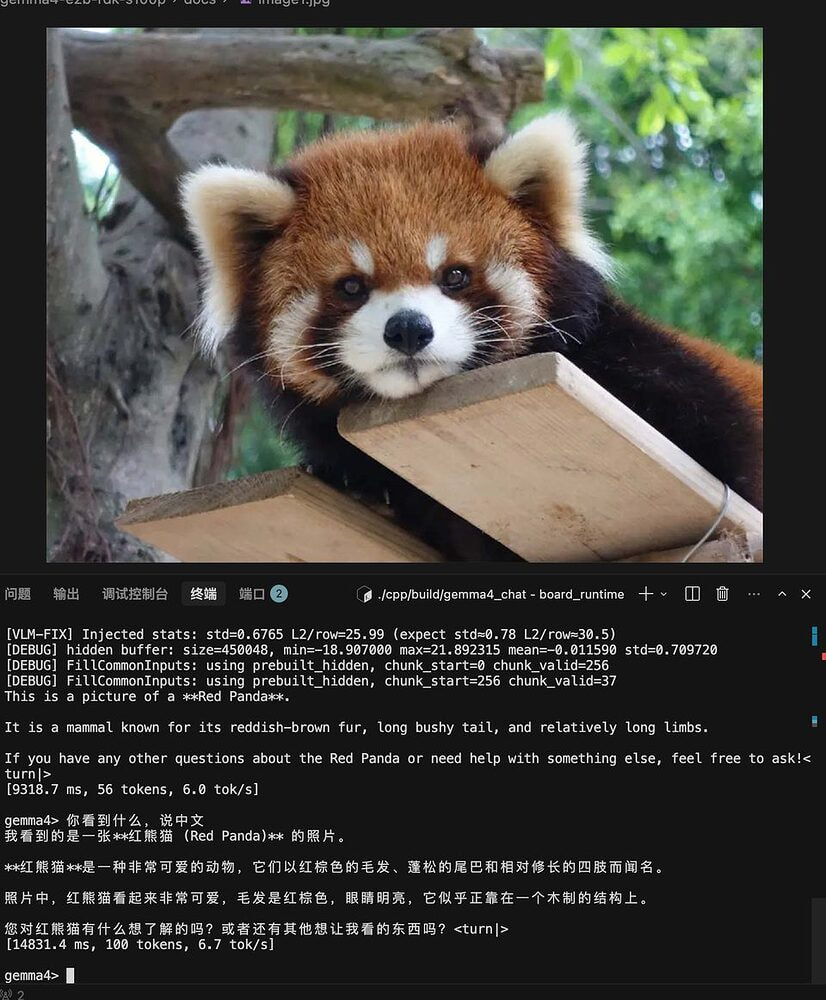
| Test image | Expected | Actual |
|---|---|---|
Red panda (image1.jpg) |
Red Panda / 红熊猫 + appearance description | Correct (see above) |
9.5 Performance Reference
Typical S100P single-core BPU (core_num=1):
| Phase | Latency | Notes |
|---|---|---|
| Vision inference | ~300 ms | Single image, ViT 16 layers |
| Text prefill | ~500 ms | 294-token VLM prompt |
| Text decode | ~200 ms/tok | Per generated token |
| End-to-end VLM | ~50 s | 294 prompt + 250 output tokens |
9.6 FAQ
Q: Board build fails with Horizon BPU SDK not found
ls /usr/hobot/lib/libdnn.so
ls /usr/include/hobot/dnn/hb_dnn.h
If missing, install OE-LLM board runtime (hbdk4_runtime_aarch64*.whl or board image).
Q: VLM output is garbage / semantically wrong
Check in order:
- Vision HBM SHA256 =
47079184...(COCO recalibrated build) - After injection, vision feature std ≈ 0.65–0.79 (not 1.0)
input_idsat image positions =0(pad), not249560- Prompt uses chat template (
<|turn>user/<|turn>model) - Run
gemma4_golden_verifyfor mask/KV alignment
Q: Output truncated at 256 tokens
KV capacity kCacheLen=4096 is fixed at HBM compile time. prompt + output ≤ 4096. VLM prompt ≈ 294 tokens → max output ~3800 tokens. Model stops at <turn|> automatically.
Appendix: Model File Download
Pre-compiled HBM models on HuggingFace:
pip install huggingface_hub
hf download ShockleyWong/gemma4-e2b-rdk-s100p --local-dir ./gemma4_e2b_deploy
| File | Description |
|---|---|
gemma4-e2b_vit_ptq.hbm |
Vision HBM (329 MB) |
gemma4-e2b_lm_chunk_256_cache_4096_ptq.hbm |
Text HBM (4.5 GB) |
tok_embeddings.bin |
Token embedding table (1.5 GB) |
tokenizer/ |
Tokenizer files |
Verify integrity:
sha256sum gemma4_e2b_deploy/model/*.hbm