0 Overview-
This article is the QAT consistency verification process and description. The consistency problem is mainly manifested in the precision problem, which is mainly the inconsistency of the inference results in the two stages, such as the large difference between the quantized model and the visualization effect of the board end inference. Through this paper, we can check the accuracy problems caused by the inconsistency of data/model/reasoning base in the QAT process, so as to help users quickly locate and solve the purpose.
1 QAT process-
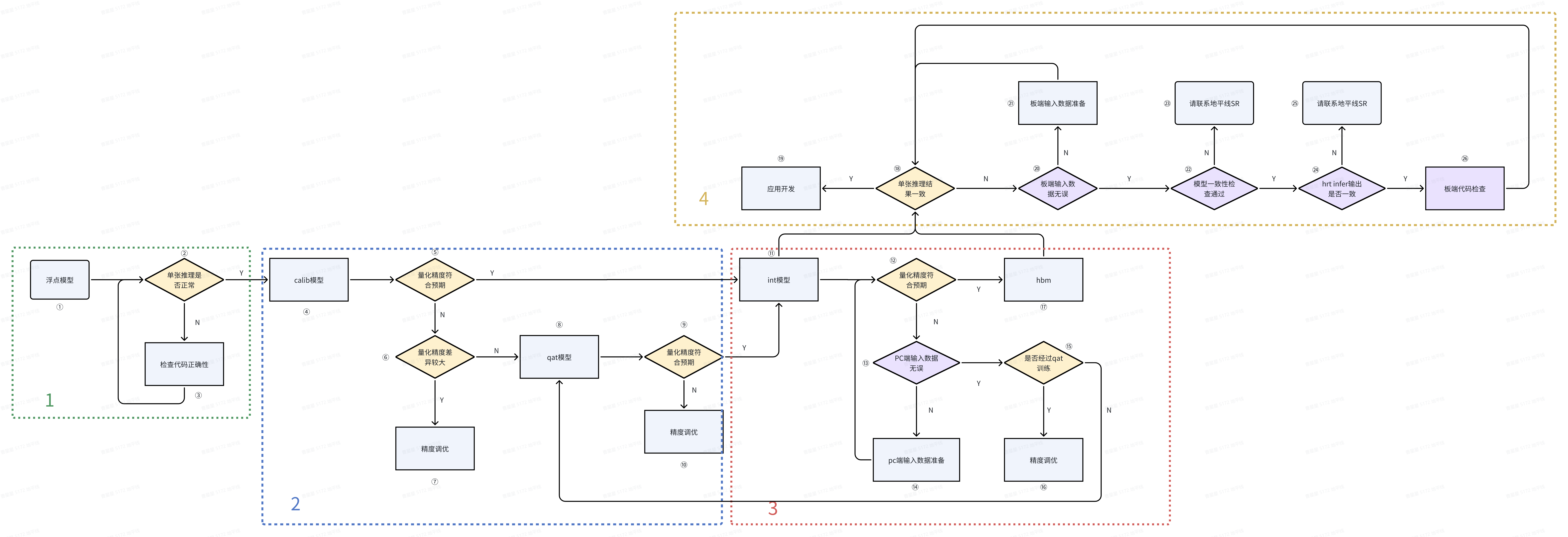
In the QAT process, the model conversion process is mainly float–>calib–>qat–>quantized → hbm. If the calib accuracy reaches the expected level, qat can be directly converted to quantized model and subsequent processes can be carried out. The overall process is divided into four parts: float phase, calib phase, int phase, and on-board deployment. The specific process is as follows:
2 Consistency verification-
This section describes the consistency verification that needs to be done when accuracy problems occur in the above figure.-
phase
environment
Purpose
verification approach
Reference code/Other descriptions
1
float
PC
Make sure the model and inference code are correct
test the floating point model with the expected accuracy of the single result or metric
1. If the inference is wrong, check the inference code
2
Calib-
QAT
PC
Verify whether the quantization accuracy of calib and qat models meets the expected accuracy
Test whether the single result or metric of calib and qat models meets the expected accuracy
1. Floating-point model evaluation code can be directly reused-
2. If the accuracy does not meet expectations, Can directly enter the debug] [precision (https://developer.horizon.cc/api/v1/fileData/horizon_j5_open_explorer_cn_doc/plugin/source/user_guide/de bug_tools.html ‘precision debug’)
3
Int
PC
Verify whether the quantization accuracy of int model meets the expectation
** Correctness of input data Verification: **-
Whether the input of model is treated as the intermediate type (Note 1)
the input data of int model needs to be treated as the intermediate type (Note 1). The processing methods are as follows: Client-side validation notice] [PTQ&QAT scheme board (https://developer.horizon.ai/forumDetail/118364000835765839 'PTQ&QAT scheme board client-side validation considerations) section 2.2.2
**int quantization accuracy verification: **-
Test whether the single result or metric of the int model meets the expected accuracy
1. It can directly reuse floating point model evaluation code-
2. When performing int model accuracy evaluation, there is no need to perform quantization and anti-quantization operations, which are completed by the quant and dequant nodes in the quantized model-
3. If the accuracy does not meet expectations, Can directly enter the debug] [precision (https://developer.horizon.cc/api/v1/fileData/horizon_j5_open_explorer_cn_doc/plugin/source/user_guide/de bug_tools.html ‘precision debug’)
4
Board deployment
PC& board
Verify whether the accuracy of hbm model is consistent with int
** Input data consistency verification: **-
Whether the model input is processed to the on-board input type (for image input, the quantized model needs to be processed to the intermediate type -yuv444_128 and hbm to the runtime type -nv12)
PC:-
1. 2. If input_source is pyramid and rgb/bgr is used during training, the pre-processing nodes centered_yuv2rgb and centered_yuv2bgr need to be inserted. For details, see: [RGB888 deployment] (HTTP: / / https://developer.horizon.cc/api/v1/fileData/horizon_j5_open_explorer_cn_doc/plugin/source/advanced_content/r gb888_deploy.html#id2 'RGB888 Deployment ')-
Board :-
1. Data preparation reference board client-side validation notice] [PTQ&QAT solutions (https://developer.horizon.ai/forumDetail/118364000835765839 Section 2.2.2 of ‘PTQ&QAT Scheme Board End Verification Considerations’-
2. There is no quantization node in the on-board model (hbm model). To prepare the on-board input data using python, if featuremap is input, quantization and padding operations need to be performed on the pc side. Quant_x = torch clamp (torch. Floor (x/scale + 0.5), - 2 ^ {n - 1} , 2 ^ {}, n - 1-1), Padding around the padding] [in the deployment for the input data do (https://developer.horizon.cc/forumDetail/163806988210447365 'in the deployment for the input data to do the padding)
** model consistency verification: **-
Use hbdk-model-verifier tool to verify the consistency of quantized model and hbm
hbdk-model-verifier Comparative verification:-
1. The command is: hbdk-model-verifier --hbm xxx.hbm --model-pt xxx.pt --model-input xxx.jpg --ip board_ip-
2. model_input Note:-
- If the data source of the model input is pyramid or resizer(nv12 format), jpg, png, and yuv files can be directly used as input. If the yuv file is used as input, the size information of the yuv file needs to be given by the --yuv-shape parameter. Since the tool does not include resize preprocessing, you need to prepare an image input-
of the same size as the model input - if the input data is from a ddr (i.e. tensor featuremap without format), you can use binary or txt format data as the input. It should be noted that the layout must be NHWC. If it is inconsistent with the input layout of the model, the tool will handle it. If it is binary data, note that the data type of the binary data needs to be consistent with the model input. If it is txt text, it can be read correctly by numpy.loadtxt.-
- If the model itself has multiple inputs, the input data is separated by commas. For example, ‘–model-input input_0.bin,input_1.bin,input_2.bin,input_3.bin’-
3. If not verified, input data, pt and hbm models are provided for analysis by Horizon technicians.
**DNN Inference database verification: **-
Comparison of PC quantized model results and hrt_model_exec infer results Consistency
dnn inference verification:-
1. DNN inference: After the first two steps confirm that the input data and model are correct, use hrt_model_exec tool to verify the correctness of DNN inference library. The command is as follows: hrt_model_exec infer --model_file xxx.hbm --input_file xxx.bin --enable_dump True --dump_format txt-
- If input_source is resizer, Command reference the use and deployment] [resizer model (https://developer.horizon.cc/forumDetail/116476319759489550 'resizer model the use and deployment) < br > - 4.1 chapter input_file Data preparation Refer to 4 for on-board data preparation. The output of-
-dump is not inverse quantized. You need to obtain the scale of the output and perform inverse quantization. python inference reference flow 3-
Compare the above two results to see if they are consistent. If they are not consistent, check whether the dnn version is updated to the latest version. If it is the latest version, provide input data, pt and hbm models for Horizon technicians to analyze.
** on-board code consistency check: **-
Pre-processing:-
Compare the actual input of the on-board model and the input of hrt is consistent.-
Check whether the visualization results of post-processing on the board and pc are consistent
If hrt_model_exec has verified that the inference hbm model and inference library are correct, carefully check whether the pre - and post-processing of the project code is correct.-
Pre-processing:-
1. The actual input data before model inference during the deployment of the printing board end (note that the number of bits saved is the same as that on the pc end). If the data and hrt input are different, the pre-processing process on the board end is inconsistent with that on the PC end. [the fusion of quantitative node implementation] (https://developer.horizon.ai/forumDetail/116476291842200072 'fusion of inverse quantization node implementation) [at deployment time do padding) for the input data (https://developer.horizon.cc/forumDetail/163806988210447365 'in the deployment for the input data to do the padding) post-treatment < / br > < br > 1. Reasoning, the output of the model plate end do [* * * *] inverse quantization (https://developer.horizon.ai/forumDetail/116476291842200072 'inverse quantization) after save, will the python post-processing * * * *, Check whether the inference result is normal. If python is normal and the board is abnormal, the post-processing code on the board is incorrect. You need to check the post-processing code to make it consistent with that on the python end.-
Special note: If the centered_yuv2rgb operator is used, there may be losses caused by the conversion process, which generally does not affect the visualization effect. See: [QAT before processing nodes interpretation and validation] (https://developer.horizon.cc/forumDetail/185446371330059448 'processing nodes before QAT interpretation and validation)
Note 1: Intermediate type corresponding to the data format (input_type_rt) :
nv12
yuv444
rgb
bgr
gray
featuremap
yuv444_128
yuv444_128
RGB_128
BGR_128
GRAY_128
featuremap