We ran a 4-channel 1080P camera recording test on RDK X5, including S230AI stereo + two USB cameras. The goal was to check long-run recording stability, H.264 saving, storage behavior, frame-rate behavior, and camera timing difference.
Test Setup
Board: RDK X5
Duration: 4 hours
Resolution: 1920x1080 for all 4 channels
Output format: H.264
Storage policy: rolling cleanup around 10 GB
Camera configuration:
| Channel | Camera | Input | Save / Encode Path |
|---|---|---|---|
| 1 | S230AI stereo left | NV12 | H.264 via hobot_codec |
| 2 | S230AI stereo right | NV12 | H.264 via hobot_codec |
| 3 | UGREEN USB Camera | MJPEG | hardware MJPEG decode + hardware H.264 encode via sp_codec |
| 4 | Huawei USB Camera | H.264 | H.264 stream copy |
4-Hour Recording Result
The 4-hour run completed successfully.
2026-06-25 15:23:10 duration reached
2026-06-25 15:23:16 finished
Final storage status:
- Retained video directory: about 11 GB
- Deleted by rolling cleanup: 254 files, 96.68 GB
- Root filesystem after test: 58 GB total, 32 GB used, 24 GB available
Frame / stream summary:
| Channel | Result |
|---|---|
| S230AI left | avg 28.995 fps, 415,509 frames |
| S230AI right | avg 28.929 fps, 414,156 frames |
| UGREEN USB | 355,024 captured / decoded / encoded, avg 24.654 fps, 0 errors |
| Huawei USB | ran about 4 hours, speed=1x, normal exit |
UGREEN single-camera test:
duration=180s
captured=5261
decoded=5261
encoded=5261
avg_fps=29.224
dq_err=0
dec_err=0
enc_err=0
So the UGREEN camera can run close to 30 fps alone, but drops to about 24.65 fps under the full 4-channel workload. This looks more like multi-camera resource contention than a basic single-camera failure.
Storage / System Observations
iostat:
- Average write throughput: 7.57 MB/s
- Peak write throughput: 50.74 MB/s
- Average write await: 654.78 ms
- Peak write await: 5361.93 ms
- Peak disk utilization: 101.64%
mpstat:
- Average user CPU: 23.90%
- Average system CPU: 5.82%
- Average iowait: 5.776%
- Peak iowait: 57.11%
CPU load became acceptable after replacing software x264 with hardware encode for UGREEN. The main concern is storage latency spikes.
Camera Timing / Web Mosaic Test
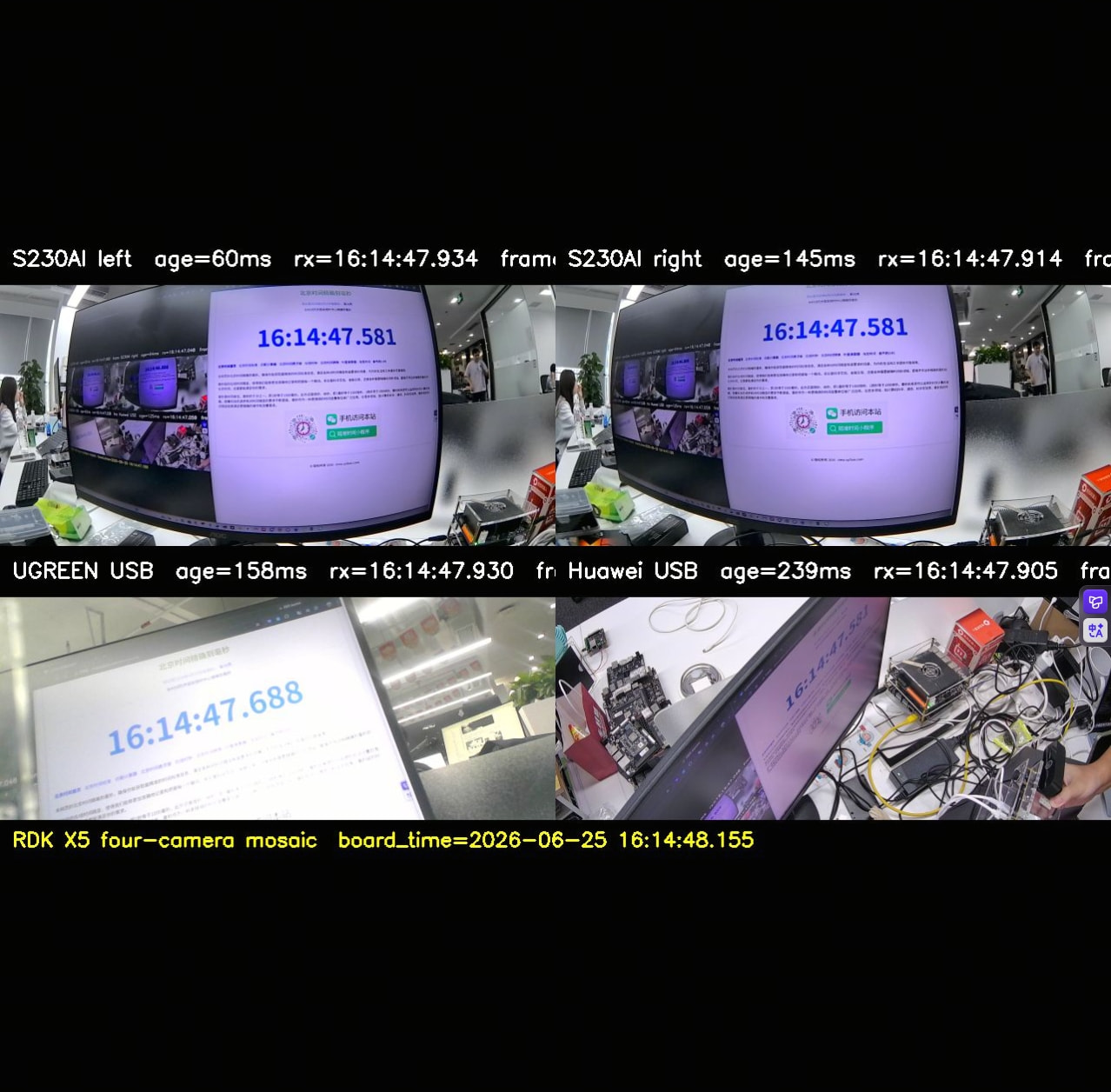
We also added a 4-camera web mosaic tool. It displays:
age=xxxms: freshness of latest framerx=HH:MM:SS.mmm: board-side receive timeboard_time=...mmm: board time when mosaic is rendered
Observed examples:
- Board-side receive-time difference across 4 cameras: about 27-31 ms
- Web display freshness difference: about 148-206 ms
- Visible stopwatch comparison showed UGREEN could differ from S230AI by around 100 ms in one sample
Important note: rx is board receive time, not true exposure timestamp. For real exposure-level sync, hardware timestamps or a dedicated visual timing target are needed.
Conclusion
The 4-channel recording pipeline completed the 4-hour test successfully. S230AI stereo and the Huawei native H.264 USB camera were stable. The UGREEN USB camera worked correctly through hardware MJPEG decode and H.264 encode with no decode/encode errors, but it did not sustain 30 fps in the 4-channel test.
For a stable production 4x1080P30 H.264 setup, using USB cameras with native H.264 output is recommended. Storage latency should also be monitored, since write-await spikes were observed during the long run.
Code Package
The test scripts and startup guide are attached:
rdk_4cam_storage_test.shh26x_segment_writer.pyugreen_hw_transcode.cppfour_cam_web_mosaic.py- README with build/start/monitor instructions
RDK_X5_4Cam_Test_Package.zip (14.9 KB)