ChatGPT is a powerful deep learning-based natural language processing model capable of generating high-quality natural language text. TogetheROS is Horizon’s robotics operating system for robotics manufacturers and eco-developers to unlock the potential of smart scenarios like robotics, enabling eco-developers and business customers to develop robots efficiently and easily. Combining these two technologies allows for the ability to control robots based on the use of text. This tutorial will show you how to use ChatGPT+TogetheROS, which is ChatRobot to turn text descriptions into car control instructions, and how to generate function-specific code from the descriptions so that the robot can perform the tasks that are described.
No picture, no truth, let’s see the actual effect first!
Effect display:
Use text description to control car movement:
Use ChatGPT to generate code to implement the required function (the car rotates in place for 6 seconds) :
Use ChatGPT to generate code to implement the required functionality (trolley square movement) :
After reading the effect, let’s understand the implementation behind it. If you want to do a good job, you must first use its tools, and before development, you need to install the relevant dependencies.
(1) Install related function packages
This tutorial provides two ways to interact with chatGPT:
Use the API provided by OpenAI
pip install openai
Use the revChatGPT feature pack
Actually interacting with chatGPT on the web side:
curl --proto '=https' --tlsv1.2 -sSf https://sh.rustup.rs | sh
sudo apt-get install cargo

pip3 install --upgrade revChatGPT
After installing the dependency, let’s take a look at the code development, first create a workspace, it is strongly recommended to learn Mr. Hu’s ROS2 introduction 21 talk!
(2) Code development
Write chatGPT_input.py
The program implements chatGPT content input nodes:
#chatGPT_input.py

import rclpy
import openai
from rclpy.node import Node
from std_msgs.msg import String

class publisherNode(Node):
 def __init__(self):
 super().__init__('publisher_node')
        self.pub = self.create_publisher(String, 'user_input', 10)
 while rclpy.ok():
            msg = String()
            user_input = input("Msg: ")
            msg.data = user_input
            self.pub.publish(msg)


def main(args=None):
    rclpy.init(args=args)
    publisher_node = publisherNode()
    rclpy.spin(publisher_node)
    publisher_node.destroy_node()
    rclpy.shutdown()

if __name__ == '__main__':
    main()
Write chatGPT_base.py
The program implements chatGPT interaction and the function of extracting, compiling and running the code in the text
#chatGPT_base.py

import re
import os
import rclpy
import openai
from rclpy.node import Node
from std_msgs.msg import String
from revChatGPT.V1 import Chatbot

chatbot = Chatbot(config={
 "access_token": "YOUR_ACCESS_TOKEN"
})
openai.api_key = "YOUR_API_KEY"

class OpenAINode(Node):
 def __init__(self):
 super().__init__('openai_node')
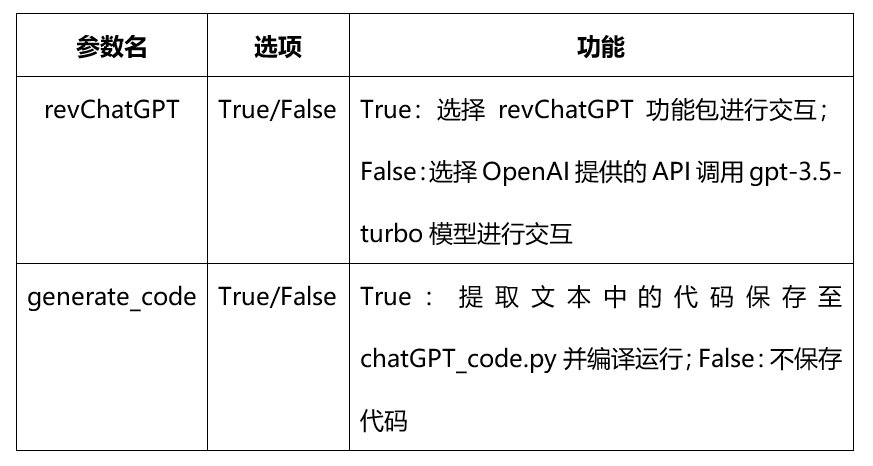
        self.declare_parameter('generate_code', False)
        self.declare_parameter('revChatGPT', False)
        self.generate_code = self.get_parameter('generate_code').value
        self.revChatGPT = self.get_parameter('revChatGPT').value
        self.publisher_ = self.create_publisher(String, 'chatgpt_node', 10)
        self.subscription = self.create_subscription(
            String,
 'user_input',
            self.listener_callback,
 10)
        self.history = ""
        self.get_logger().info("init success")

 def listener_callback(self, msg):
        input_text = msg.data
        pub_msg = String()
        self.get_logger().info("start get respones")
 if self.revChatGPT == False:
            self.history += input_text
            self.history += " "
            response = openai.ChatCompletion.create(
            model="gpt-3.5-turbo",
            messages=[
                    {"role": "user", "content": self.history+input_text}
                ]
            )
            pub_msg.data = response['choices'][0]['message']['content']
 print(pub_msg.data)
            self.history += pub_msg.data
            self.history += " "
 else:
            prev_text = ""
 for data in chatbot.ask(input_text,):
                message = data["message"][len(prev_text):]
 print(message, end="", flush=True)
                prev_text = data["message"]
            pub_msg.data = prev_text
 if self.generate_code == True:
            start = "```python"
            end = "```"
 if start in prev_text and end in prev_text:
                start_index = prev_text.index(start) + len(start)
                end_index = prev_text.index(end, start_index)
                result = prev_text[start_index:end_index].strip()
                self.file = open(os.getcwd()+'/src/chatGPT_test/chatGPT_test/chatGPT_code.py', 'w')
                self.file.write(result)
                self.file.close()
                os.system("bash build_run.sh")
 print()
        self.publisher_.publish(pub_msg)

def main(args=None):
    rclpy.init(args=args)
    chatgpt_node = OpenAINode()
    rclpy.spin(chatgpt_node)
    chatgpt_node.destroy_node()
    rclpy.shutdown()

if __name__ == '__main__':
    main()
Write chatGPT_control.py
The program implements the chatGPT text content parsing function, extracts control-related information, and publishes it in the Twist message
#chatGPT_control.py

import re
import time
import rclpy

from rclpy.node import Node
from std_msgs.msg import String
from geometry_msgs.msg import Twist

class controlNode(Node):
 def __init__(self):
 super().__init__('control_node')
        self.subscription = self.create_subscription(
            String,
 'chatgpt_node',
            self.listener_callback,
 10)
        self.publisher_ = self.create_publisher(Twist, 'cmd_vel', 10)
        self.history = ""

 def listener_callback(self, msg):
 print("start parse msg")
        strlx = re.compile(r"linear.x = (.*?)(?![\d.-])")
        strly = re.compile(r"linear.y = (.*?)(?![\d.-])")
        strlz = re.compile(r"linear.z = (.*?)(?![\d.-])")
        strax = re.compile(r"angular.x = (.*?)(?![\d.-])")
        stray = re.compile(r"angular.y = (.*?)(?![\d.-])")
        straz = re.compile(r"angular.z = (.*?)(?![\d.-])")
        input_text = msg.data
        twist = Twist()
 if re.search(strlx,input_text):
            val_linear_x = re.search(strlx,input_text).group(1)
            twist.linear.x = float(val_linear_x)
 print(val_linear_x , end = " ")
 if re.search(strly,input_text):
            val_linear_y = re.search(strly,input_text).group(1)
            twist.linear.y = float(val_linear_y)
 print(val_linear_y , end = " ")
 if re.search(strlz,input_text):
            val_linear_z = re.search(strlz,input_text).group(1)
            twist.linear.z = float(val_linear_z)
 print(val_linear_z , end = " ")
 if re.search(strax,input_text):
            val_angular_x = re.search(strax,input_text).group(1)
            twist.angular.x = float(val_angular_x)
 print(val_angular_x , end = " ")
 if re.search(stray,input_text):
            val_angular_y = re.search(stray,input_text).group(1)
            twist.angular.y = float(val_angular_y)
 print(val_angular_y , end = " ")
 if re.search(straz,input_text):
            val_angular_z = re.search(straz,input_text).group(1)
            twist.angular.z = float(val_angular_z)
 print(val_angular_z)

        self.publisher_.publish(twist)
        time.sleep(1)
        twist0 = Twist()
        self.publisher_.publish(twist0)

def main(args=None):
    rclpy.init(args=args)
    control_node = controlNode()
    rclpy.spin(control_node)
    control_node.destroy_node()
    rclpy.shutdown()

if __name__ == '__main__':
    main()

dev_ws
├── build_run.sh(编译和运行的脚本)
├── build
├── install
└── src
    └── chatGPT_test
        ├── package.xml
        ├── resource
        ├── setup.cfg
        ├── setup.py
        ├── test
        └──chatGPT_test
            ├── chatGPT_base.py
            ├── chatGPT_code.py(用于存放chatGPT生成的代码)
            ├── chatGPT_control.py
            └── chatGPT_input.py
The whole function package is placed in the last attachment, you can download and compile directly if you are interested, you need to fill access_token and api_key in chatGPT_base.py, the specific operation steps are as follows.
(3) Operation process
Use text description to control car movement
Input text reference
First input: I have now connected your output to the ros node, I want you to control the car movement, so I need you to translate what I say into the car movement instructions, such as: “Go forward”, I need you to answer: “linear.x = 1,linear.y = 0,linear.z = 0,angular.x = 0,angular.y = 0,angular.z = 0”.
Subsequent input: forward, backward, left, right, etc., experience the function.
Start-up process
ros2 launch turn_on_wheeltec_robot turn_on_wheeltec_robot.launch.py

cd /home/sunrise/dev_ws
source /opt/tros/setup.bash source install/setup.bash
ros2 run chatGPT_test chatGPT_input
ros2 run chatGPT_test chatGPT_base
ros2 run chatGPT_test chatGPT_control
Use ChatGPT to generate code to implement the required functionality
Input text reference
Spin the car in place for six seconds:
Generate a ROS 2 Python program to control the car rotation. Specific requirements are as follows:
1, the car needs to rotate at the angular speed of 0.5 for 6 seconds, after the rotation is finished, the speed is changed to 0.0, so that the car stops moving. The topic name should be “/cmd_vel”;
2. Make “geometry_msgs/msg/twist.hpp” the header file of the twist message, which contains two members: linear velocity and angular velocity;
3. All twist messages should be of floating point type. Make sure that the generated code can fulfill the above functional requirements. Just the code, no explanation required.
The car moves in a square path:
Generate a ROS 2 Python program to control the car movement. Specific requirements are as follows:
1. The motion path is a square. The topic name should be “/cmd_vel”;
2. Use geometry_msgs/msg/twist.hpp as the header file of the twist message containing both linear and angular velocity members with a linear velocity of 0.2 and a movement time of 3 seconds. The angular velocity is 1.0 and the rotation time is 2 seconds.
3, time control use time.sleep;
4. All twist messages should be of floating point type;
5, after the end of the operation, change all speed to 0, and sleep for 1 second to ensure that the car stops moving. Make sure that the generated code can fulfill the above functional requirements. Just the code, no explanation required.
Start-up process
ros2 launch turn_on_wheeltec_robot turn_on_wheeltec_robot.launch.py

cd /home/sunrise/dev_ws
source /opt/tros/setup.bash source install/setup.bash
ros2 run chatGPT_test chatGPT_input
ros2 run chatGPT_test chatGPT_base --ros-args -p generate_code:=True -p revChatGPT:=True